


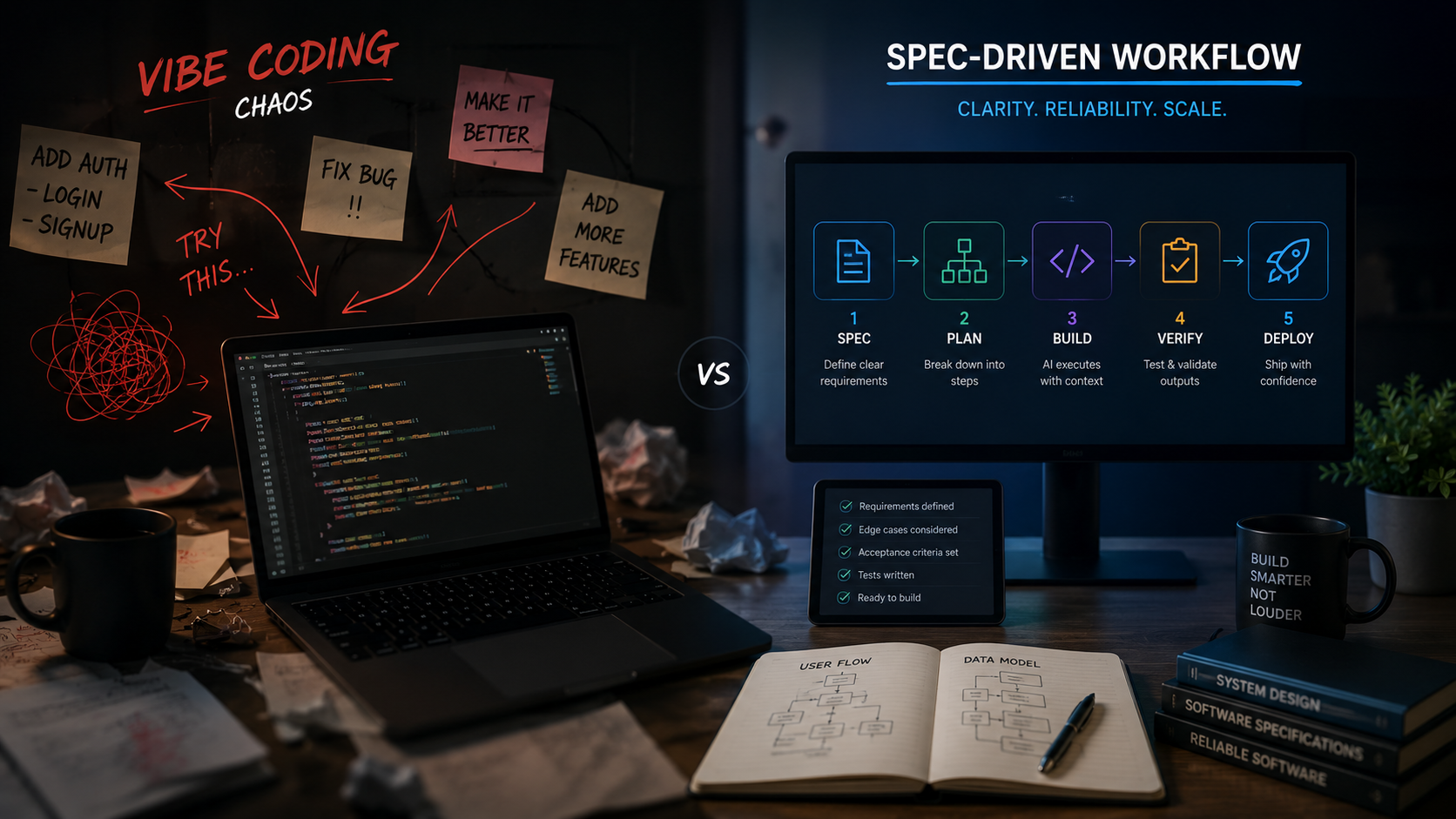
Moving Beyond Vibe Coding to Production Engineering
I remember when my first vibe-coded project collapsed. During week one, prompting an AI assistant felt like magic. I shipped complex app screens in minutes. By month three, every new prompt broke old files, and hidden bugs filled the repository.
Unstructured AI prompt sessions feel fast at first. You type an idea into a chat box, press enter, and watch lines of code appear. But quick prompts cannot replace careful planning. Technical debt builds up quietly across your files.
Engineering teams now shift away from random chat sessions. They adopt structured, spec-driven engineering pipelines instead. You set clear architectural rules and formal specifications before writing any code.
Here is how to move from quick prompt experiments to production-ready workflows. You will learn to write project constitutions, create living Markdown specs, and manage AI tools to keep your code clean.
The Three Month Wall of Unstructured Prompting
Why do vibe-coded projects hit a maintenance wall around month three?
Vibe-coded projects hit a wall because chat sessions lack persistent memory and structural rules. As codebases grow, AI models lose track of past choices, creating duplicate code, broken dependencies, and high technical debt.
When you rely on reactive chat sessions, initial speed feels great. You prompt the model, check the output visually, and move to the next task without taking notes.
This approach works for quick weekend scripts. But without saved documentation or safety guardrails, small changes break integrations across multiple files.
Have you ever wondered why your AI-generated app feels hard to refactor? How do you keep control as your codebase grows?
The primary issue comes when the model forgets earlier decisions. Each new chat window starts fresh. The AI must guess how your backend modules connect. Over time, your repository turns into a mess of scattered code and conflicting utility files.
Here are four signs that your codebase hit the vibe-coding wall:
- Small bug fixes create new errors in unrelated files.
- The AI tool creates duplicate helper functions because it cannot find existing ones.
- You spend more time writing fix-it prompts than planning features.
- Onboarding a new developer requires explaining many undocumented choices.
As discussed in an article on spec driven development on Towards Data Science, shifting from raw prompt iteration to specification artifacts helps teams avoid maintenance traps. Setting clear system boundaries early protects your codebase as features grow.
To compare how different AI models handle complex reasoning tasks, read my full test results on Gemini 3.0 Riftrunner.
Establishing Your Project Constitution and Mission

How do project constitutions prevent requirements drift in AI workflows?
A project constitution sets clear rules, tech stack choices, and safety boundaries in repository files. AI tools read these Markdown files before starting work, keeping formatting, naming, and architecture consistent across sessions.
Every solid workflow starts with clear alignment before you write code. A project constitution outlines your core rules, chosen tech stack, and testing guidelines in version-controlled Markdown files.
This shared source of truth guides your AI tools across multiple sessions and team members. What rules belong in your team constitution? How do you stop requirements drift early?
When I set up a new project, I create a main configuration file for core constraints. This file sits in the root folder so every AI tool can reference it and keep generated code aligned.
Your project constitution should list your engineering standards clearly:
- Approved libraries and framework versions like Next.js, TypeScript, or Python.
- Code style choices, folder structures, and naming rules.
- Security policies like input validation and key protection.
- Testing rules that every new pull request must pass.
Setting these baseline rules stops AI assistants from adding unwanted packages or changing your folder layouts. When your tools know the rules, generated code fits your standards.
To learn more about how smart tools handle automated tasks, check out this guide comparing AI agents, automations, and agentic AI on my site.
Moving From Informal Chats to Spec Driven Development
What is the main difference between vibe coding and spec-driven development?
Vibe coding uses trial-and-error prompting to generate code on the fly. Spec-driven development requires writing clear specifications first, using Markdown docs as the source of truth for AI tools.
Spec Driven Development (SDD) makes specifications your main development artifact. Instead of typing open prompts into a chat window, you define feature goals, technical boundaries, and test criteria in structured Markdown specs.
Your automation agents then write code against these exact guidelines. What features should you specify first? How do you structure your planning phase?
Instead of telling an AI tool to build a user login system, an SDD workflow breaks the task into small Markdown files:
- Feature Intent: Explains what the user needs and why the feature exists.
- Technical Specs: Lists API routes, database fields, and data types.
- Acceptance Criteria: Defines exact conditions required to complete the task.
Writing these details down forces you to fix structural questions before generating code. It removes guessing games for human reviewers and automated tools.
As outlined in a blog post on AI native engineering by ThoughtWorks, structured specifications act as a bridge between human design intent and automated code creation. When you clarify the spec first, writing code becomes simple.
Here is a practical comparison between informal chat workflows and spec-driven workflows:
- Requirement Definition: Informal chats use vague text prompts, while spec-driven workflows use version-controlled Markdown files.
- Context Persistence: Informal chats lose context between sessions, while spec-driven workflows store context in the repository.
- Quality Control: Informal chats rely on visual checks, while spec-driven workflows rely on automated tests tied to acceptance criteria.
- Maintenance Cost: Informal chats cause technical debt, while spec-driven workflows keep modules clean over time.
Coordinating AI Agents Models and Workspace Context

How does context engineering improve AI coding accuracy?
Context engineering provides AI assistants with clean project documentation, custom instructions, and structural examples. Supplying exact workspace context reduces AI errors and helps generated code fit existing patterns.
Modern AI engineering uses a clear stack of autonomous agents, specialized models, and workspace context. You assign specific tasks to tools like Claude Code while adding custom instructions directly to your workspace.
Which model fits your current needs? How do you curate context for better outputs?
Selecting the right tool for each job keeps work efficient and affordable:
- High-Level Architecture: Use reasoning models to review specs and outline system designs.
- Code Execution: Use specialized CLI agents like Claude Code to edit multiple files in your repository.
- Fast Code Completion: Use lightweight models for quick syntax help and repetitive code.
Context engineering turns raw models into helpful team members. Organizing documentation into clean repository files gives your tools exact guidance without overloading context limits.
A guide on vibe coding from Augment Code notes that long, unorganized chat threads introduce noise that can degrade code quality. Curating clean context files helps your tools focus on relevant code.
If you build visual AI features or media workflows, review my breakdown of Gemini 3 Pro Image Gen features to see how multimodal models handle media tasks.
Validating Code and Stopping Infinite Self Correction Loops
How do you stop AI agents from getting stuck in infinite self-correction loops?
You stop infinite loops by setting retry limits, running automated tests, and requiring human review when a task fails repeatedly. Clear script pass-fail rules give agents concrete goals instead of vague error messages.
Autonomous agents can get trapped in endless self-correction loops without human oversight. When an agent finds a test error, it may edit code repeatedly, adding new bugs with each attempt.
Creating validation scripts and test suites helps your code match expected results before merging. What automated tests protect your deployment pipeline? How do you know when a feature is ready?
To stop runaway agent loops, add these safety measures to your repository:
- Automated Linter Checks: Run strict linting rules right after an agent edits a file.
- Targeted Unit Tests: Run unit tests for changed parts instead of full test suites every time.
- Max Retry Limits: Set workflow scripts to stop agent runs after two or three failed attempts.
- Human Review Triggers: Ask a developer to review code whenever automated tests fail repeatedly.
Setting these guardrails saves time and stops agents from rewriting working code in frustration. Automated testing gives fast, objective feedback that guides the agent back on track.
Building a Sustainable Hybrid Engineering Workflow
When should a team transition from vibe coding to spec-driven development?
Teams should transition when project complexity grows, extra developers join, or features move toward production. Vibe coding works best for early exploration, while spec-driven development gives long-term stability.
The best workflow for creators combines the speed of rapid exploration with the reliability of version-controlled specifications.
By setting clear transition rules, you can prototype freely and formalize plans before pushing to production. When is your project ready for a formal spec? How can you streamline your next build sprint?
You do not need to give up quick prompt exploration. Use a two-phase workflow that uses the strengths of both methods:
- The Exploration Phase: Use free-form prompting and rapid visual tests to try new product ideas and build quick proof-of-concept prototypes.
- The Specification Phase: Once an idea works, document requirements, file layouts, and data models in Markdown files.
- The Execution Phase: Use automated coding tools to build production-ready code against your formal specification.
- The Verification Phase: Run automated tests and human code reviews to confirm all criteria are met.
This hybrid approach gives you creative freedom to test ideas without weakening codebase stability. You move fast during initial testing and keep complete control during production.
By structuring development around clear specifications, you build software that scales easily alongside your team and goals.
Follow Owais Abdullah on Google Search & Discover
Add this domain as a preferred source to see new AI engineering, Next.js SaaS, and Digital FTE breakdowns prioritized in your Google Top Stories, AI Overviews, and Discover feed.
Architecture FAQs
Was this article helpful?
Your feedback helps improve our future articles and tutorials.
Discussion & Thoughts
Join the conversation with your perspective