

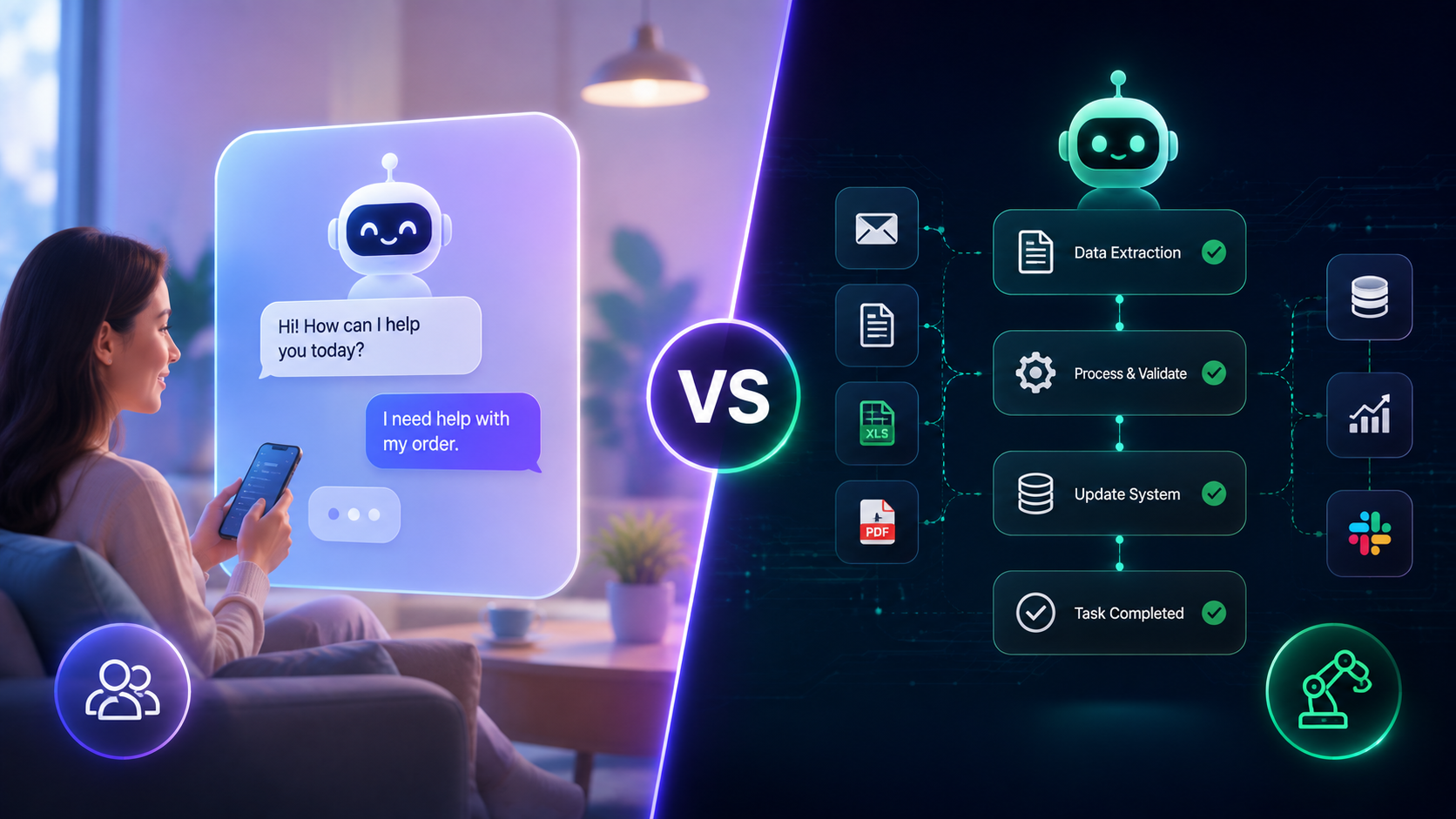
Front-Office Chatbots vs Back-Office Digital FTE Systems
When I build automated workflows for client projects, I often see companies make the same mistake. They install a basic chat widget on their site and expect it to handle their entire operation. Before long, that simple setup breaks down because it cannot execute complex backend tasks.
Modern business architecture requires a dual engine structure that separates customer communication from backend execution. Front-office chatbots handle light, conversational touchpoints like collecting lead details and answering quick questions. Meanwhile, back-office digital FTEs perform multi-step technical tasks across databases and web software.
If you want to scale your operations without expanding headcount, you need both engines working together. This guide explains how front-office chat layers and back-office execution systems divide the workload to keep your business running smoothly.
What is the difference between front office chatbots and back office digital FTEs?
Front-office chatbots handle live site traffic, quick questions, and initial lead intake through simple chat interfaces. Back-office digital FTEs are autonomous software agents that execute multi-step backend tasks across internal systems.
Understanding User Intent in Automated Systems
Every visitor who reaches your website has a specific goal in mind. Some visitors want quick answers about pricing or office hours, while others want to submit project requirements or schedule a service call.
When you direct every user request into a single chat window without backend execution support, response times slow down. A front-office interface captures intent instantly, while a back-office worker carries out the promised action behind the scenes.
If you want a deeper breakdown of how autonomous agents differ from standard automations, check out my guide on AI agents, automations, and agentic AI systems.
The Front-Office Layer as Your Conversational Facade
The front-office layer acts as the digital front door for your business. It relies on Retrieval-Augmented Generation models connected to web chat widgets, messaging platforms, and intake forms. Its main job is to welcome visitors, gather intent, and direct users to the right resource.
I design front-office chat systems to remain fast and responsive. They do not run heavy calculations or alter central databases directly. Instead, they give visitors immediate attention and pass detailed requests to internal systems.

How fast should a front office chatbot respond to web visitors?
A front-office chatbot should respond in under two seconds to keep site visitors engaged and capture leads before they leave your page.
Key Characteristics of Front-Office Chatbots
Front-office conversational interfaces share several distinct characteristics:
- Fast response speed: They provide instant replies using cached documentation and lightweight language models.
- Lead capture focus: They collect name, email, phone, and inquiry details through natural conversation.
- Multi-channel availability: They run on websites, mobile apps, WhatsApp, and social media channels.
- FAQ resolution: They answer common customer queries without calling human support agents.
Why Front-Office Chatbots Cannot Handle Full Workflows Alone
Many business owners expect a site chat widget to update CRM records, generate customized PDF quotes, and issue invoices. Relying solely on a front-end script for these tasks creates security risks and performance delays.
When a front-end chat tool attempts heavy system actions, the user interface freezes or returns errors. Front-office tools excel at conversation, but they lack the reasoning capacity to manage complex, multi-step backend pipelines.
For detailed strategies on setting up conversational interfaces, you can read the resource on AI agents versus chatbots for business growth.
The Back-Office Layer as Your Autonomous Execution Engine
Behind every front-office conversational tool lies the operational engine. Back-office digital FTEs function as full-time digital employees equipped with autonomous tools, memory, and reasoning paths.
Unlike basic chat widgets, digital FTEs do not talk to website visitors directly. They operate inside your internal network, reading incoming data, deciding necessary steps, and executing actions across connected software applications.
What tasks can a back office digital FTE complete automatically?
A back-office digital FTE can score incoming leads, update database records, create custom proposal documents, process payments, and dispatch webhook notifications.
Primary Functions of Back-Office Digital FTEs
Digital FTEs manage complex backend routines through autonomous agent frameworks. Here are their core operational functions:
- Autonomous task reasoning: They evaluate data payloads and determine which software tool to call next.
- Database management: They write, edit, and audit records across databases like PostgreSQL and Airtable.
- API and webhook integration: They send data packets between web tools through custom REST API connections.
- Document creation: They assemble structured reports, contracts, and financial spreadsheets based on fresh input.
How Digital FTEs Handle Complex Errors
When standard automated scripts encounter missing data fields or broken API endpoints, they stop running entirely. Digital FTEs use agentic reasoning loops to identify errors, try alternative data paths, or send clean alerts to human managers.
This operational resilience allows back-office agents to handle long workflows without constant human oversight. They process background tasks 24 hours a day, keeping operational costs low while maintaining high accuracy.
To understand how enterprises organize background processing systems, explore this detailed guide on agentic back-office automation.
Connecting Touchpoints Through the Dual-Engine Pipeline
A dual-engine automation framework achieves its full potential when the front-office layer and back-office layer talk to each other without manual intervention.
When a front-office chatbot collects a new lead on your website, it packages the input into a structured event payload. It sends this payload to an event queue, which alerts the back-office digital FTE to start processing.
How do front office chatbots pass data to back office agents?
Front-office chatbots pass structured data payloads to back-office agents using secure webhooks, message queues, and API endpoints.
Steps in the Dual-Engine Operational Pipeline
Here is how data flows through a complete dual-engine automation pipeline:
- User Interaction: A site visitor submits project details into a front-office chat window.
- Event Dispatch: The chatbot formats the chat transcript and sends a JSON payload to a message queue.
- Lead Evaluation: The back-office digital FTE reads the message, checks lead quality against set rules, and assigns a score.
- System Updates: The digital FTE updates your CRM records, creates a dedicated folder, and generates a draft proposal.
- Confirmation Alert: The digital FTE notifies your sales team on Slack and sends a personalized follow-up email to the lead.
Eliminating Manual Handoff Delays
In traditional business setups, staff members manually copy information from chat logs into CRM tools, spreadsheets, and task managers. This manual transfer leads to lost data, slow follow-up times, and missed business opportunities.
Connecting front-end chat widgets directly to back-end execution agents removes manual data entry entirely. Your sales team receives fully processed lead records without typing a single entry manually.
For engineering guidance on connecting conversational layers with central enterprise tools, review this article on front-office conversational AI architecture.
Choosing the Right System for Your Growth Stage
Every growing business faces unique operational hurdles. Choosing between a front-office chatbot, a back-office digital FTE, or a complete dual-engine system depends on where your main operational bottlenecks exist.
If your primary issue is missed web leads and high inquiry volume, start by building a fast front-office conversational layer. If your team spends hours on manual data transfer, focus on deploying back-office digital FTEs first.

When should a business upgrade to a full dual engine automation setup?
You should upgrade to a full dual-engine setup when high customer chat volume causes back-office delays or when manual data entry stalls lead follow-up.
Matching Automation Tools to Business Challenges
To select the right automation setup for your current needs, compare these common operational scenarios:
- High site traffic with low lead capture: Deploy a front-office chatbot to engage visitors and capture contact information.
- Heavy administrative workload: Implement back-office digital FTEs to process records, update databases, and draft files automatically.
- Scaling operations across multiple platforms: Build a dual-engine pipeline to connect customer touchpoints directly with backend execution.
- Complex financial or compliance workflows: Use specialized agent orchestration tools designed for back-office accuracy and reporting.
Planning a Phased Automation Deployment
I always recommend a phased approach when building custom automation systems. Start by mapping your current customer touchpoints and identifying repetitive backend tasks.
First, launch a lightweight chatbot to handle initial customer questions. Next, build back-office agents to automate your most time-consuming manual workflow. Finally, connect both systems through webhooks to establish a dual-engine pipeline.
If you are exploring orchestration platforms to manage back-office agent workflows, check out this review of AI agent platforms for team workflows.
Follow Owais Abdullah on Google Search & Discover
Add this domain as a preferred source to see new AI engineering, Next.js SaaS, and Digital FTE breakdowns prioritized in your Google Top Stories, AI Overviews, and Discover feed.

Owais Abdullah
Web & AI Engineer · Founder @ Octively
Spec-driven developer and AI engineer. Founder of Octively, building Next.js SaaS platforms, autonomous Digital FTEs (AI employees), and production-ready intelligent workflows.
Recent Posts

AI Agent Over-Engineering: Simple Workflows vs 30-Agent Architectures
Sep 26, 2026
Stop AI Agent Overengineering and Use Simple Workflows
Sep 25, 2026
Jev System One Model: Cut AI Classifier Latency and Costs
Sep 24, 2026
AI Workflow Automation for Small Businesses: The 4-Step Implementation Guide
Sep 22, 2026
Did you find this article helpful?
Questions I get
Frequently Asked Questions
Discussion & Thoughts
Join the conversation with your perspective