

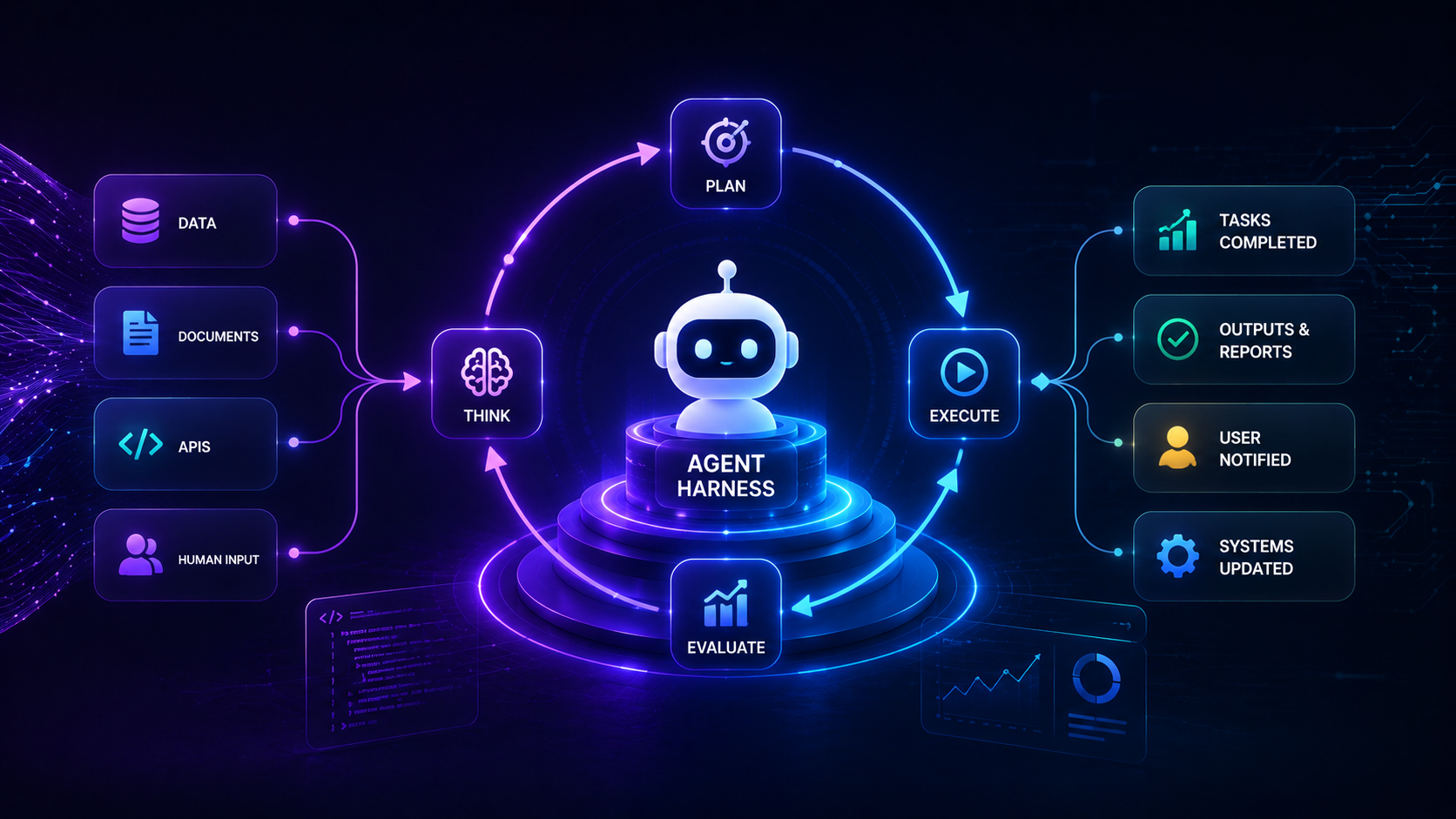
Agent Harness Architecture for Digital FTE Runtime Loops
When I build AI agent systems for clients, business founders often ask if a language model can act as a Digital FTE (Full-Time Equivalent). The idea of an autonomous worker handling customer support or data entry sounds simple on paper. However, treating a raw language model as an independent employee leads to immediate failure in production systems.
A language model is a reasoning engine, not an autonomous software program. When an API endpoint returns unexpected JSON formatting or a database connection times out, a raw model prompt stops working. To make an AI worker reliable, you need software infrastructure wrapped around the model.
An agent harness architecture provides the execution loop, state persistence, schema validation, and retry logic that models lack natively. In this guide, I will show you how building a dedicated LLM runtime environment turns unpredictable model output into stable software workflows.
What is an agent harness in AI architecture? An agent harness is a software framework that wraps a language model with state management, input validation, auto-retry loops, and tool execution guardrails for stable background operation.
Understanding this architecture is essential if you want to deploy background workers that execute multi-step tasks without crashing. Before building full execution harnesses, I recommend understanding the core differences between AI agents and static automations to structure your system logic correctly.
Why Raw LLMs Fail as Standalone Digital FTEs
In my engineering work, the biggest mistake I see teams make is relying on long prompt instructions to control complex workflows. A prompt can guide the model's reasoning style, but it cannot fix network timeouts, invalid JSON syntax, or state loss. When external APIs fail, a simple script relying on raw model output crashes instantly.
Language models operate statelessly by default. They take input text, calculate token probabilities, and output text responses. They do not know what happened during a previous task cycle unless you pass the full context back in.
How does a digital FTE differ from a standard prompt script? A digital FTE relies on an agent harness with persistent state storage, active validation, and self-correction, whereas prompt scripts fail when schema errors or API timeouts occur.
Here are four primary reasons raw language models fail when deployed without a harness:
- State Volatility: Raw models do not persist internal execution variables between API calls.
- Unhandled Tool Errors: API rate limits and unexpected schema changes break execution flow instantly.
- Context Contamination: Long conversations fill up memory windows with irrelevant background details.
- Lack of Execution Guardrails: Unvalidated model output can execute dangerous code or database actions.
Why do prompt-driven agent scripts fail in production? Prompt-driven scripts lack runtime error handling, schema validation, and state recovery. Unhandled API errors or malformed model outputs cause unrecoverable crashes.
To build reliable background workers, you must stop treating the model as the whole program. Treat the model as a processing unit inside a controlled software shell.
Core Components of an Agent Harness Runtime Loop
An effective agent harness functions as the operating system for your language model. The harness handles external inputs, sends structured messages to the model, intercepts model outputs, and executes tool commands safely.
When I design runtime environments, I structure the harness loop into four distinct stages:
- Task Initialization: The harness loads persistent context, user goals, and tool definitions into the execution workspace.
- Model Reasoning Step: The harness sends formatted prompts to the LLM and receives structured action requests.
- Action Verification: The harness validates tool parameters against strict software schemas before running code.
- Execution and State Persistence: The harness runs the tool, logs results to a database, and updates the task state.
What core components make up an LLM runtime environment? A complete LLM runtime environment includes a persistent execution loop, memory storage like PostgreSQL or vector databases, schema validation wrappers, and automated retry mechanisms.
According to AWS technical documentation on AI agent workflows, structured agent control loops separate reasoning from system side-effects, ensuring system stability across multi-step tasks.
If an external tool call fails due to a network glitch, the harness captures the exception automatically. Instead of crashing, the harness formats the error message and passes it back to the model during the next iteration.
Implementing Persistent State and Structured Storage
A human employee remembers work completed yesterday, where files live, and what steps remain unfinished. A raw LLM context window wipes clean as soon as a script process terminates. Storing all historical data in a single context window eventually causes memory overflow and high API costs.
To solve this, an agent harness relies on external database systems to store long-term context snapshots. I regularly use PostgreSQL alongside pgvector to split memory into operational context and archived knowledge.
Here is how a structured storage architecture organizes agent memory:
- File Workspace: A local disk directory where agents store intermediate text, code, and documents during execution.
- Relational Database: PostgreSQL tables storing task status, execution logs, user permissions, and structured tool outputs.
- Vector Index: Similarity databases storing past interaction embeddings for semantic search retrieval.
- Context Snapshot Engine: A daily memory rollup script that compresses long session logs into concise summary records.
Why is persistent state storage necessary for AI agents? Persistent state storage allows an agent to save multi-step task progress in external databases, ensuring smooth recovery and execution continuity if a system process restarts.
When a server reboots or an execution process times out, the harness reloads the latest state snapshot from PostgreSQL. The agent resumes work on step five without repeating steps one through four.
Tool Validation Wrappers and Error Handling Loops
Allowing a language model to send raw SQL queries or shell commands directly to production systems creates massive security risks. Models hallucinate parameters, introduce incorrect variable names, or format JSON objects with missing brackets.
A validation wrapper acts as a strict security checkpoint between the model's intent and your production infrastructure. Every tool request generated by the model must pass through schema validation code, such as Zod or Pydantic, before execution.
How do validation wrappers protect system reliability? Validation wrappers test model outputs against schema definitions before calling external tools. If errors occur, the harness feeds error feedback to the model to auto-correct outputs.
Here is how an automated self-correction loop processes tool errors:
- The LLM outputs a tool call with an invalid parameter type.
- The harness schema validator catches the type mismatch and halts execution.
- The harness formats a detailed error report showing expected syntax versus actual output.
- The harness sends the error report back to the LLM as a system message.
- The LLM reads the error feedback and returns a corrected tool call.
This error-handling loop resolves common formatting mistakes automatically. Your backend database never receives malformed queries, and your application remains stable.
Shifting from Prompt Engineering to Harness Engineering
Prompt engineering focuses on tweaking text phrases to coax better answers out of a model. Harness engineering focuses on building software infrastructure that enforces system safety, memory persistence, and operational consistency.
As new language models release, prompt engineering tricks often become obsolete. In contrast, well-written validation layers, retry logic, and state management code remain effective across every model upgrade.
Here is a quick comparison between prompt engineering and harness engineering approaches:
Prompt Engineering Focus:
- Writing long system prompts with few-shot examples
- Tweaking text wording to prevent formatting errors
- Relying on model memory inside single context windows
- Manual intervention when execution scripts crash
Harness Engineering Focus:
- Enforcing strict JSON schema validation wrappers
- Catching API errors with automated retry loops
- Offloading state to external PostgreSQL and vector storage
- Automated self-correction without human intervention
By building clear software guardrails around your models, you transform fragile AI experiments into reliable background workers. The model supplies the reasoning, but the harness delivers the software stability required for production systems.
Follow Owais Abdullah on Google Search & Discover
Add this domain as a preferred source to see new AI engineering, Next.js SaaS, and Digital FTE breakdowns prioritized in your Google Top Stories, AI Overviews, and Discover feed.

Owais Abdullah
Web & AI Engineer · Founder @ Octively
Spec-driven developer and AI engineer. Founder of Octively, building Next.js SaaS platforms, autonomous Digital FTEs (AI employees), and production-ready intelligent workflows.
Recent Posts




Did you find this article helpful?
Questions I get
Frequently Asked Questions
Discussion & Thoughts
Join the conversation with your perspective